


Strategic Prioritization Matrix: Helping Your Team Decide What Matters Most
A prioritization matrix is a visual decision‑making tool that compares possible actions, programs, or requests against agreed‑upon criteria. The matrix helps groups move from “everything is urgent” to “this is what we do first—and why.
Step 1: Identify the potential actions you need to prioritize
Examples include:
- Mutual aid requests
- Project start up
- Organizational partnerships
- Grant opportunities
- Media campaign
- Advocacy actions
- Volunteer projects
- Budget investments
Tip: If you have existing strategic objectives, include them, but keep the list manageable. It may be helpful to have a small team to work together on each step of the process, but be mindful to keep a quick pace and momentum.
Step 2: Define your criteria
Criteria definitions will vary for each organization, but some common examples are provided below:
Criteria definitions will vary for each organization, but some common examples are provided below:
- Impact – Contributes to long‑term goals, values, or mission; has negative consequences if not done
- For Nonprofits: Mission alignment, Community impact
- For Mutual Aid Groups: Community‑identified priority, Equity impact, Capacity to respond
- Urgent – Requires immediate attention – Often tied to deadlines or external pressure
- For Nonprofits: Resources availability, Capacity, Sustainability, Funding readinesFor Mutual Aid Groups: Urgency of need, Risk of harm if unmet, Significant loss if unaddressed
Step 3: Rate your selected criteria and plot them on the matrix.
It is important to get a good representation of participants in the decision-making process but also not to slow down the process. As a group:
- Review each item
- Discuss where it falls on both criteria
- Place it on the matrix
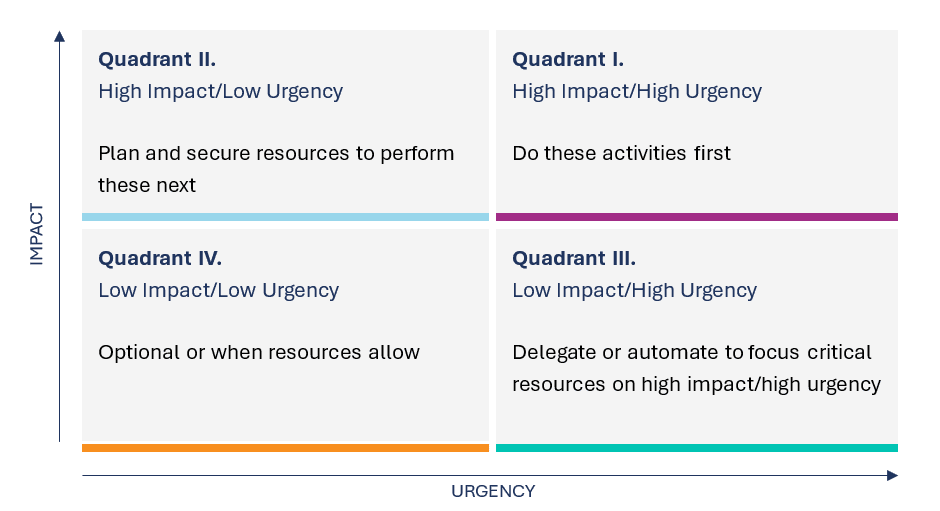
Step 4: Step back and review all four quadrants
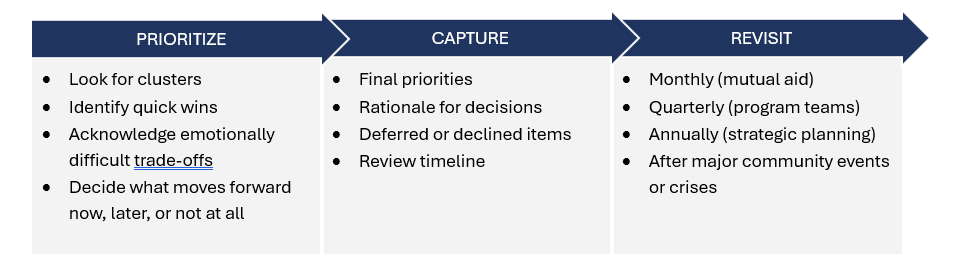
Step 5: Decide what actions to move forward with and make a plan
Common Mistakes to Avoid:
- Confusing urgent with impact
- Overloading Quadrant I
- Ignoring Quadrant II (until it becomes urgent)
- Treating Quadrant III requests as mandatory
Additional Practices:
- Use this tool weekly for planning
- Pair with a calendar and task list
- Review at the end of the day or week
- Protect time for Quadrant 2 work
Other resources
If your group or organization is unsure where to begin exploring a new effort, our Step-by-Step Guide for Nonprofit Rapid Response may be helpful.